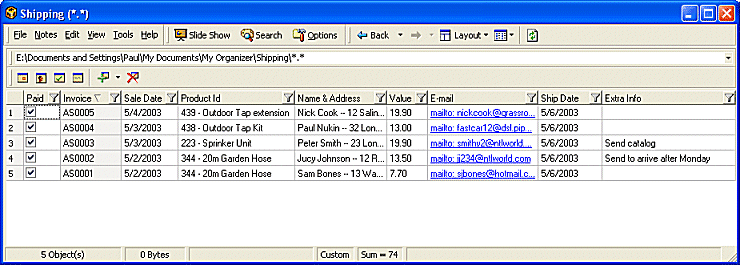
The screenshot below provides a typical example of how My Organizer can be used to maintain a database of information.
The example below is a database related to product shipments.
The table below explains how the Notes fields have been utilized
| Column | Original Column | Notes |
| Row Number | Icon Column | The icon column displays row numbers when the filename column is turned off |
| Paid | Slideshow | The slideshow column consists of checkboxes and is ideal for indicating completion of a task/payment etc. |
| Invoice | Bookmark | When running in My Organizer mode the bookmark column displays an ID for each entry (see My Organizer Explained). By changing the bookmark name and using the sequential ID option, incremental invoice numbers can be generated for each new entry in the database. |
| Sale Date | Start Date | Date field for date of sale transaction |
| Product ID | Notes 1 | Product ID mixing numeric and textual information |
| Name & Address | Notes 2 | Name and address information written in "multiple line" format (see Notes Editor) |
| Value | Index | The index field being a numeric field can be
used for product values.
|
| Notes 3 | Email addresses shown as a hyper-text link (see Notes Editor) | |
| Ship Date | Finish Date | Date field displaying date of product shipment |
| Extra Info | Notes 4 | Notes field used for miscellaneous information relating to an order |
 Note
Note
| Related Topics |